
Remote work can be life-changing. It can also be a magnet for scammers who know job seekers are busy, hopeful, and often applying quickly. The good news is most fake postings have patterns. Once you know what to look for, you can screen opportunities in minutes and protect your time, your money, and your identity.
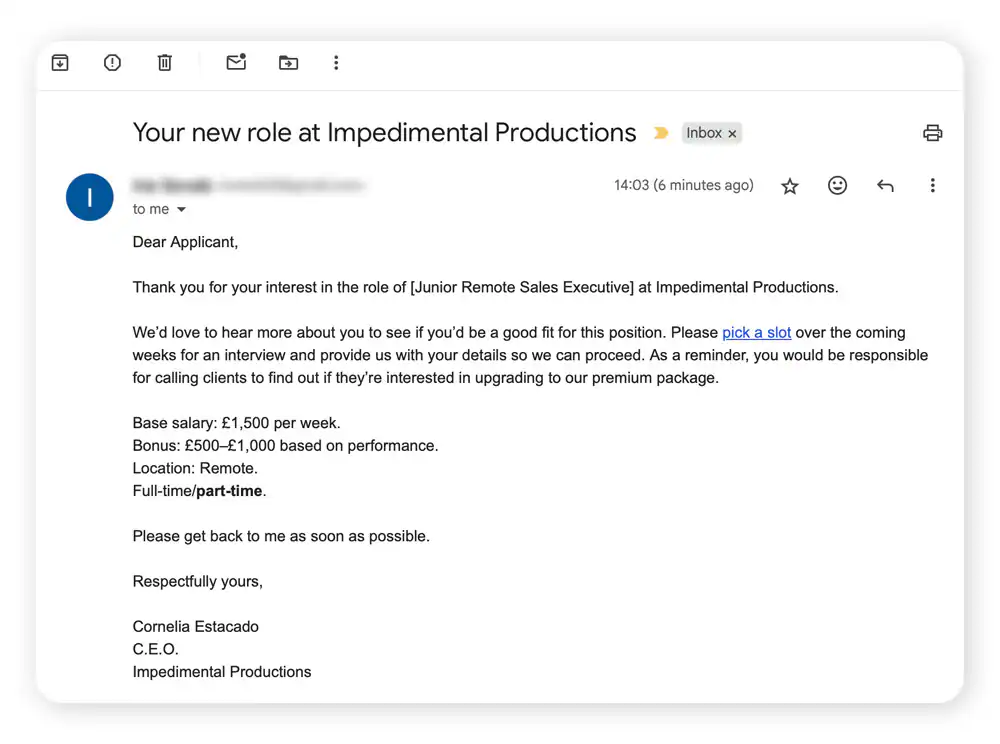
Below are the most common remote job scam red flags, plus exactly what to do instead.
What scammers want
Not every scam looks the same, but most are after one (or more) of these:
- Your money (fake equipment fees, training fees, “application processing” costs).
- Your identity (Social Security number, driver’s license, bank info, full date of birth).
- Your time and labor (unpaid “trial tasks” that are actually real work).
- Your accounts (email, messaging apps, even your current employer credentials if you reuse passwords).
Keep that goal in mind. It makes it easier to spot when a “job” is really a setup.
Red flags in the posting
1) The pay is vague or unrealistic
Watch for postings that say things like “Earn up to $10,000 per month” without explaining how, or that mention “weekly pay” with no hourly rate, salary range, or commission structure.
What to do: Look for a clear compensation model. If it is commission-based, the posting should explain the product or service, typical sales cycle, and whether leads are provided. If it is hourly or salaried, there should be a range that fits market reality for the role and your location.
2) The role description is generic
Many scams use copy-pasted text like “We are looking for motivated individuals with a positive attitude” or “No experience needed, full training provided” and very little about day-to-day duties, tools, KPIs, or who you report to.
A legitimate posting usually includes specifics, even in a short listing, like what tools you will use (Zendesk, Salesforce, Excel), what success looks like (ticket volume, quota, turnaround time), your schedule or time zone expectations, and who you work with.
What to do: Look for details you could act on in week one. If the posting cannot explain responsibilities, reporting line, hours, and how performance is measured, treat it as high-risk until proven otherwise.
3) No real company footprint
Be cautious if the company has no functioning website, no leadership listed, no employees on LinkedIn, or a website that is only a one-page template with stock photos and no address.
What to do: Verify the company through multiple sources: their website, LinkedIn company page, employee profiles, and third-party mentions (news, industry associations, app store listings). If you are in the US, the Better Business Bureau can be one data point, but it is not definitive. In many countries, checking a government business registry is more useful (for example, a state or provincial registry, or Companies House in the UK). One channel is not enough.
4) The email domain does not match
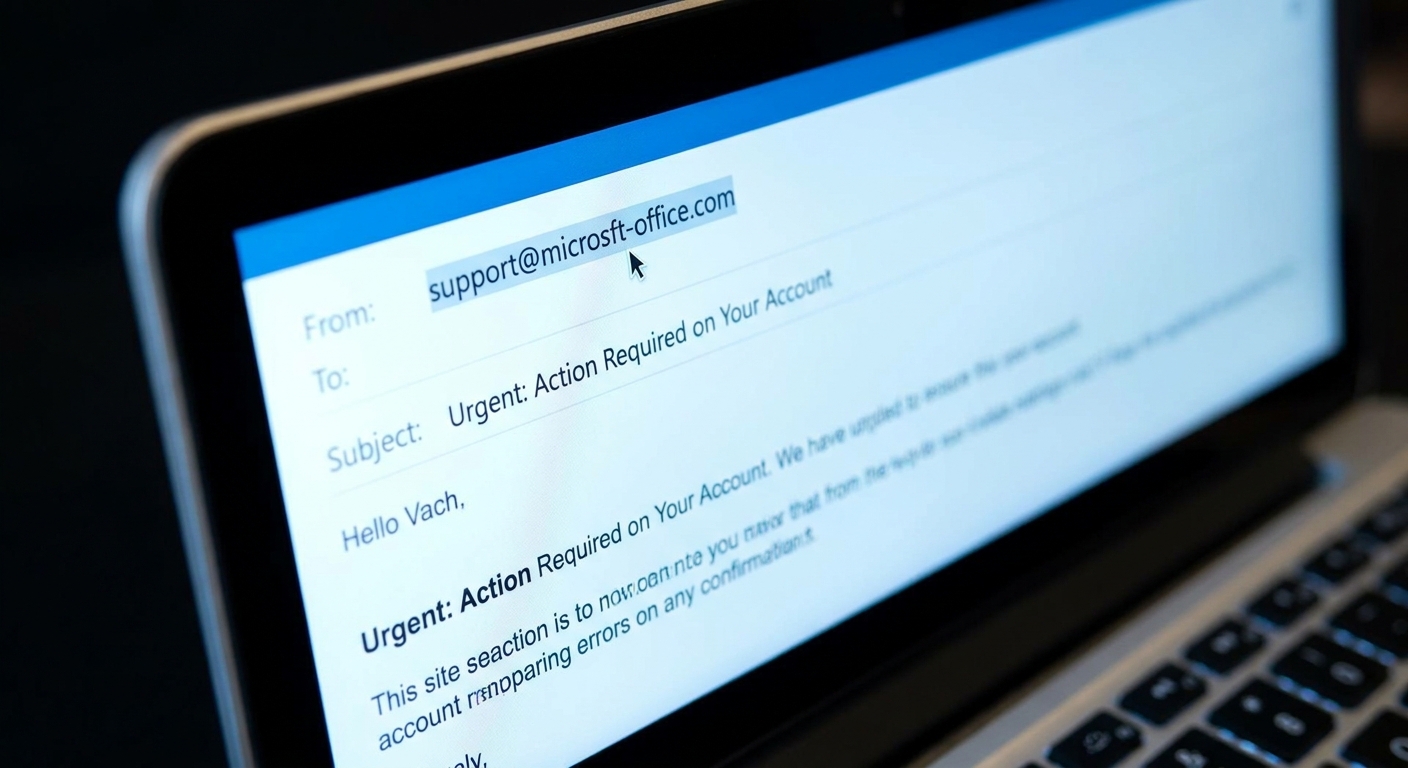
It is a major red flag if a “recruiter” reaches out from a free email address (Gmail, Yahoo) or from a domain that is close but slightly off, like company-careers.com instead of company.com.
What to do: Go to the company’s official website (type it in yourself, do not click links) and look for a careers page or contact details. If you are unsure, call the main company number and ask if the recruiter works there.
Red flags in the hiring process
5) The “interview” is only text-based
Many scams rely on chat-only interviews through Telegram, WhatsApp, Signal, or a platform you have never heard of. Real companies do sometimes use messaging, but they typically do it in addition to a phone or video screen, not instead of one.
What to do: Ask for a scheduled phone or video conversation with the hiring manager. If they refuse or keep pushing chat-only, walk away.
6) You are “hired” immediately
If the timeline is unbelievably fast, that is a clue. Legitimate hiring can move quickly, but it still includes basic steps: verification of experience, at least one live conversation, and clear next steps.
What to do: Request the full process in writing: who you will meet, how long it takes, and what the background check or reference check looks like (if applicable).
7) Pressure tactics and urgency
Scammers love phrases like “limited slots,” “must respond in 30 minutes,” or “we need you to start today” because urgency reduces your ability to verify.
What to do: Slow it down on purpose. A legitimate employer will respect reasonable boundaries like “I can confirm by tomorrow after I review the offer details.”
8) They ask for sensitive info too early
You should not be asked for your Social Security number, bank account numbers, or copies of identity documents in the early stages of a hiring process.
There are legitimate moments when an employer may need sensitive details, usually after a conditional offer and typically through a verified HR or background-check workflow with clear consent. The key is timing, channel, and transparency.
What to do: Share only what is necessary at each stage. Early on, that is usually your resume and basic contact info. Save sensitive information for formal onboarding through a verified system you can independently confirm belongs to the company.
Money moving the wrong way
9) You are asked to pay to get hired
Common examples include paying for background checks, training, “starter kits,” software licenses, or access to job leads.
Rule of thumb: In most standard employment situations, you should not pay to work. There are a few exceptions in legitimate independent contractor arrangements, but those come with clear contracts, established companies, and zero pressure.
10) The fake check and equipment trick
This one is extremely common in remote job scams. They send a check, tell you to deposit it, then instruct you to buy equipment from their “approved vendor.” Later, the check bounces, and you are responsible for the money you sent.
What to do: Do not accept checks for equipment purchases or send money to a vendor you did not choose and verify. Legitimate employers often ship equipment directly. If you do buy something yourself, reimbursement should go through normal payroll or expense systems after you start, with documentation, and without being routed to a specific mystery vendor.

How to verify in 10 minutes
Step 1: Find the company independently
Type the company name into your browser yourself. Do not rely on links from the job posting or email.
Step 2: Match it to the official careers page
Look for the same role on the company’s official careers page. Titles can vary, but the core details should match.
Step 3: Confirm who you are speaking with
Check LinkedIn for the recruiter’s profile and company affiliation. Then look for other employees. A company with “hundreds of openings” but no real employee footprint is a problem.
Step 4: Inspect domains and contact details
Make sure email addresses, website domain, and any scheduling links align with the official company domain.
Step 5: Look for normal hiring steps
At a minimum, expect a live conversation and a written offer that includes:
- Job title and department
- Pay rate or salary and pay schedule
- Supervisor or reporting line
- Location expectations (remote, hybrid, time zone requirements)
- Start date and contingencies (background check, eligibility to work)
Watch for impersonation scams
Some scams are extra convincing because they borrow a real company name, logo, or employee names. The posting looks legitimate, but the email domain is slightly off, the “recruiter” is not actually employed there, or the application link goes to a fake form.
What to do: Always verify through the company’s official careers page and switch channels. If someone emails you, go to the official website and contact the company using the published phone number or careers email. If the job is real, they will confirm it. If they get angry, rush you, or refuse to be verified, that is your answer.
If you already engaged
Take a breath. It happens, especially when you are applying to a lot of roles.
If you shared personal information
- Stop responding and do not send additional details.
- Document everything (emails, messages, names used, phone numbers, links, screenshots).
- Consider a fraud alert or credit freeze with the major credit bureaus if you shared sensitive info like your SSN.
- Monitor financial accounts (bank, credit cards) and consider ChexSystems monitoring if you shared banking details.
- Change passwords anywhere you reused them, and turn on multi-factor authentication.
- Watch for follow-up “recovery” scams that claim they can get your money back for a fee.
If you sent money or deposited a check
- Contact your bank immediately and explain what happened.
- Report it to the platform where you found the posting.
- File a report with the FTC at reportfraud.ftc.gov (US).
- If you are outside the US, use your country’s consumer protection or cybercrime reporting portal. Search for the official government site, not a private “reporting” page.
If you believe your identity information was compromised, you can also use identitytheft.gov (US) for a step-by-step recovery plan.
Quick checklist
Use this as a final 60-second screen. If you hit more than one or two items, pause and verify before applying.
- The pay is vague, wildly high for the role, or “guaranteed” with no explanation.
- The posting is generic and light on real responsibilities.
- The company website is missing, broken, brand-new, or does not match the job details.
- The recruiter uses a free email address or a suspicious look-alike domain.
- The interview is chat-only or happens exclusively on Telegram, WhatsApp, or Signal.
- You are offered the job immediately with minimal screening.
- You are pressured to act fast or keep the process secret.
- You are asked for SSN, bank info, or ID documents before a verified offer or verified background-check process.
- You are asked to pay for training, a background check, a kit, or software.
- You are sent a check to deposit or told to buy equipment through a specific vendor.
If you want a simple north star: legitimate employers move slowly enough for you to confirm who they are, and they never need you to pay to be hired.